Bluetooth Audio: Versions and Codecs — Do They Affect Sound Quality?
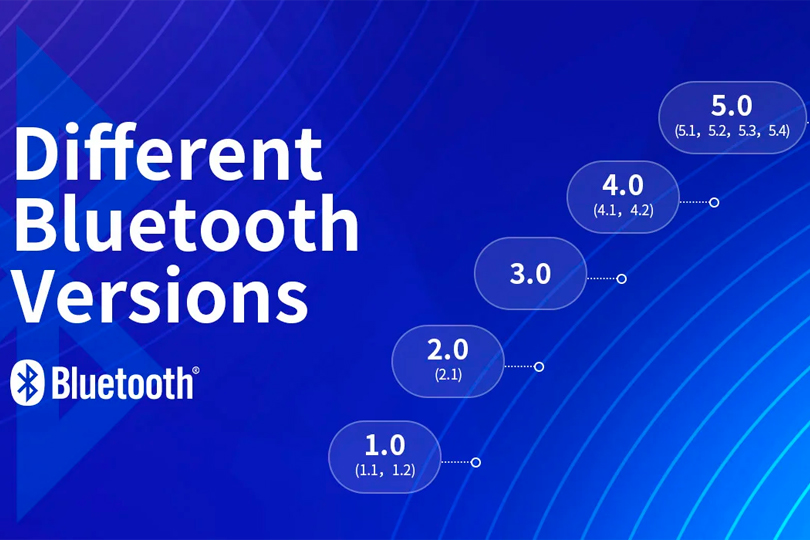
Bluetooth is a wireless communication technology that allows you to connect headphones, portable speakers, stereo systems, or soundbars to your smartphone or laptop. Today’s market is flooded with devices that support different Bluetooth protocol versions and various audio codecs. But what do these specs really mean? What’s the latest version? Do you need to understand it all — and most importantly, does it actually impact sound quality? Let’s dive in.
Hardware First, Bluetooth Second
Before we get technical, one key point: the Bluetooth version or codec impacts sound quality far less than the design and tuning of the device itself. If you test multiple wireless headphones or speakers, you’ll notice clear differences in audio performance. But if you take the same device and connect it using different Bluetooth versions or codecs, the difference might be subtle — or even inaudible.
In short, don’t base your buying decision solely on Bluetooth specs or codec support. They are not the most important factors when choosing headphones or speakers.
Bluetooth Versions: What’s the Difference?
Bluetooth technology has evolved significantly since the early 2000s. Sound transmission is no longer as compressed or lossy as it was during the era of Bluetooth 1.1 or 2.0. Here’s a breakdown of the main differences in Bluetooth versions you’ll find in modern devices:
- Bluetooth 3.0: Significantly increased data transfer speed (up to 24 Mbps vs. 2.1 Mbps in 2.0), but at the cost of higher power consumption.
- Bluetooth 4.0: Introduced Low Energy (LE) mode while keeping the 24 Mbps speed.
- Bluetooth 4.1: Improved coexistence with LTE networks (common in 4G smartphones).
- Bluetooth 4.2: Enhanced data speed and security.
- Bluetooth 5.0: Quadrupled range and doubled speed compared to 4.2.
- Bluetooth 5.1: Introduced accurate positioning and directional tracking.
Most of these upgrades focus on data speed and power efficiency, not directly on sound quality. However, faster data rates can improve the reliability of high-bitrate codecs like aptX HD or LDAC, which may result in better sound fidelity — provided both devices support them.
Important: For a specific Bluetooth version to function, both the source (e.g., phone) and receiver (e.g., headphones) must support it. If your phone supports Bluetooth 5.1 but your headphones only support 4.2, the connection will default to 4.2.
Bluetooth Audio Codecs: What Really Affects the Sound
If Bluetooth version has limited impact, the codec being used plays a much bigger role in determining audio quality and latency.
A codec is a complex algorithm that encodes and decodes audio data for wireless transmission. Compression is essential — sending less data makes the connection more stable and reduces the chance of dropouts.
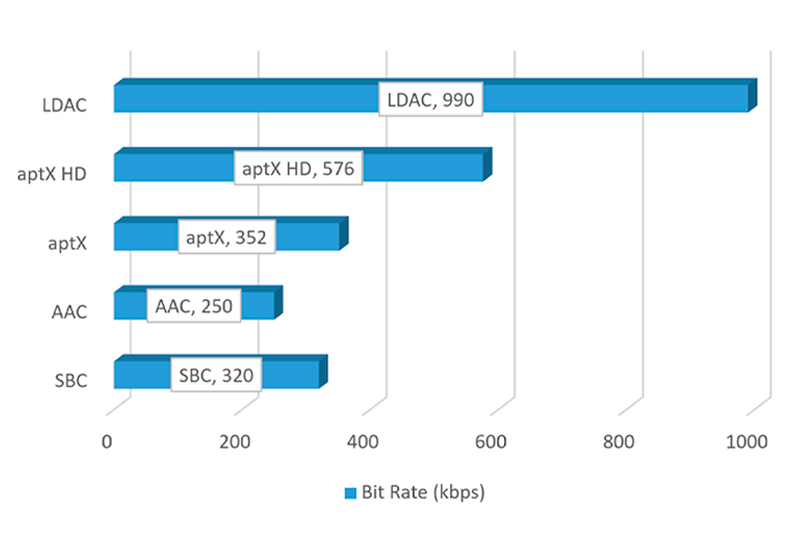
All current Bluetooth codecs are lossy, meaning they discard some audio data to reduce bitrate — typically compressing from CD-quality (1411 kbps) down to around 300–900 kbps.
Codecs also differ in latency, or the delay between when the audio is transmitted and when it’s heard. High latency causes lip-sync issues when watching video.
Just like Bluetooth versions, both devices must support the same codec.
Key Bluetooth Codecs Explained
Here’s a breakdown of today’s most relevant Bluetooth audio codecs:
- SBC (Subband Codec)
The default codec for all Bluetooth devices. Bitrate up to 345 kbps. Acceptable audio quality if implemented well, but latency often exceeds 100 ms, leading to poor sync with video.
- LC3 (Low Complexity Communication Codec)
The next-gen Bluetooth audio codec, designed to replace SBC. Announced at CES 2020 as part of the LE Audio standard (introduced with Bluetooth 5.2). Offers better sound at lower bitrates and lower power consumption — but still rolling out slowly.
Qualcomm's aptX Family:
- aptX
Basic codec from Qualcomm. Bitrate of 352 kbps and lower latency (~120 ms) than SBC.
It uses differential encoding for faster processing.
- aptX HD
Higher-quality version with 576 kbps bitrate at 48 kHz / 24-bit resolution. Offers improved sound over standard aptX.
- aptX Low Latency (LL)
Optimized for video and gaming. Reduces latency to ~40 ms, below the noticeable threshold for AV desync.
However, rarely supported in modern devices.
- aptX Adaptive
Dynamically adjusts bitrate from 280 to 420 kbps, balancing quality, latency, and connection stability. Latency ranges from 50–80 ms. Intended to replace both HD and LL variants.
Other Codecs:
- AAC (Advanced Audio Codec)
Apple’s preferred codec. Bitrate up to 256 kbps. Offers better audio quality than MP3 at the same bitrate.
Performs well on Apple devices, but poorly on many Android devices due to inconsistent implementations.
If you're on iOS, AAC support in your headphones is a plus. On Android? Not so much.
- LDAC (by Sony)
Sony’s answer to aptX HD. Supports up to 990 kbps at 96 kHz / 24-bit.
Requires Android 8+ and is most often found in Sony gear.
Offers excellent sound quality but may suffer from stability issues on less capable devices.
- LHDC (HWA)
A high-resolution codec from China with bitrates of 400/560/900 kbps.
Competing with LDAC, but still limited to a handful of supported devices.
Key Takeaways
- Bluetooth version has little direct impact on sound quality.
- Both your source and receiver must support the same codec or version to benefit from it.
- The difference between codecs may be minor on some devices, and more apparent on others.
- AAC is best for Apple users; it’s inconsistent on Android.
- aptX and its variants (HD, Adaptive) are ideal for Android, but unsupported on Apple devices.
- Sound quality is still mainly determined by the headphones or speaker design, not the codec or Bluetooth version.
Final Word
When shopping for wireless headphones, IEMs, or Bluetooth speakers, don’t let codec support overshadow core factors like driver quality, tuning, comfort, battery life, and build. Even a device that only supports SBC can sound amazing if well-designed — while one with all the latest tech might still fall flat sonically.
Bluetooth specs are important, but they’re not everything. Let your ears and needs guide you first.